

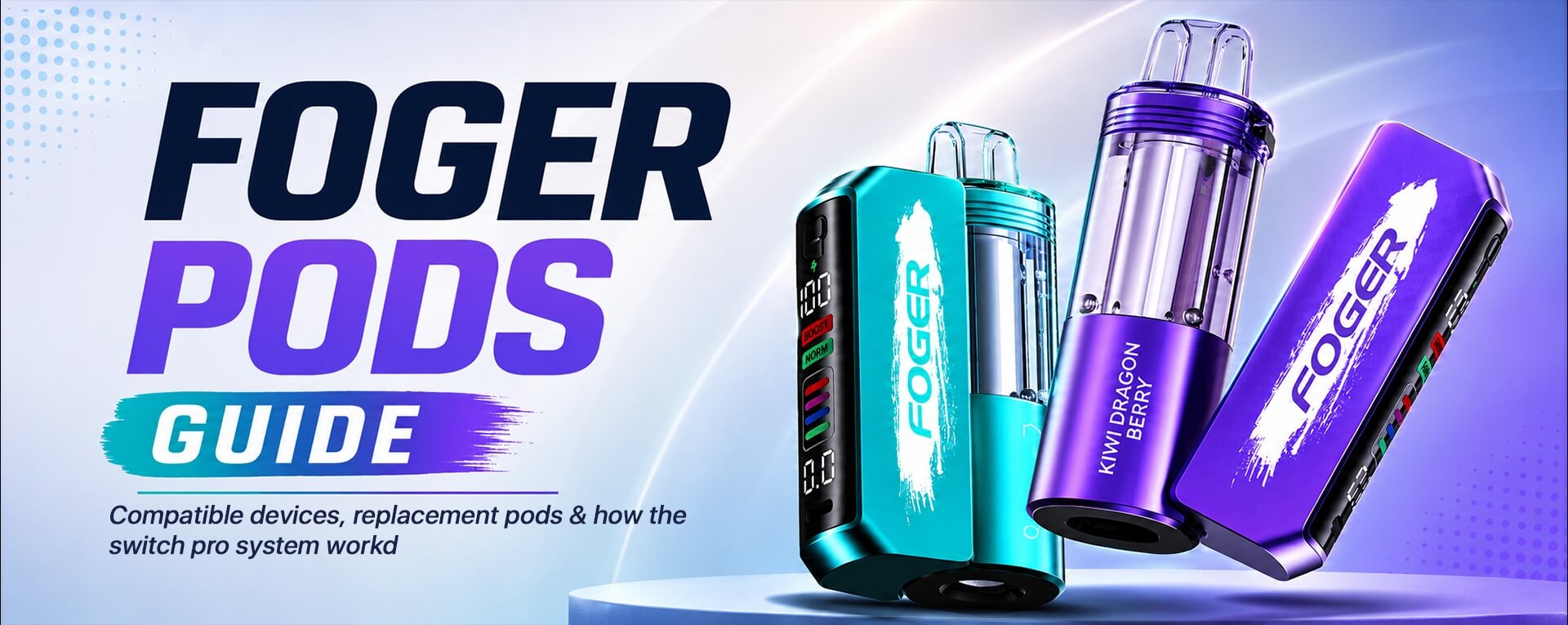
Most disposable vapes are one piece. The battery, coil, and e-liquid stay inside the same device. When the e-liquid runs out, the whole vape is finished.
Foger Pods work differently. The Foger Switch Pro separates the reusable charging dock from the prefilled pod. You keep the dock, then switch the pod when you want a new flavor or when the current one is empty.
That small change makes the system feel more flexible. It still gives adults the simple, prefilled convenience of a disposable vape, but it removes the need to buy a full new battery dock every time.
The Foger Switch Pro Kit is the starting point because it includes both the dock and a pod. Once you have the dock, you can buy replacement Foger Pods separately.
This product contains nicotine. Nicotine is addictive and intended for adults of legal smoking age only. Keep away from children and pets. Learn more from the CDC’s vaping health information
What Are Foger Pods?
Foger Pods are sealed, prefilled replacement pods that connect to the Foger Switch Pro magnetic dock.
Each pod contains the e-liquid, dual mesh coil, airflow control, and a small internal battery. The separate dock carries the larger rechargeable battery, display, and USB-C charging port.
When the pod is empty, remove it from the dock. Then attach a new pod.
This system gives you prefilled convenience without the filling, bottle handling, or coil changes that come with refillable devices.
Foger Pods at a Glance
| Feature | Foger Switch Pro Pods |
|---|---|
| Pod type | Prefilled replacement pod |
| Designed for | Foger Switch Pro magnetic dock |
| E-liquid capacity | 19mL |
| Nicotine strength | 5% / 50mg |
| Coil | 1.0-ohm dual mesh coil |
| Puff count | Up to 30,000 in Normal Mode |
| Boost Mode | Up to 18,000 puffs |
| Refillable | No |
| Battery dock included | No, included with the starter kit |
| Connection | Magnetic dock-and-pod system |
The Foger Switch Pro System Explained
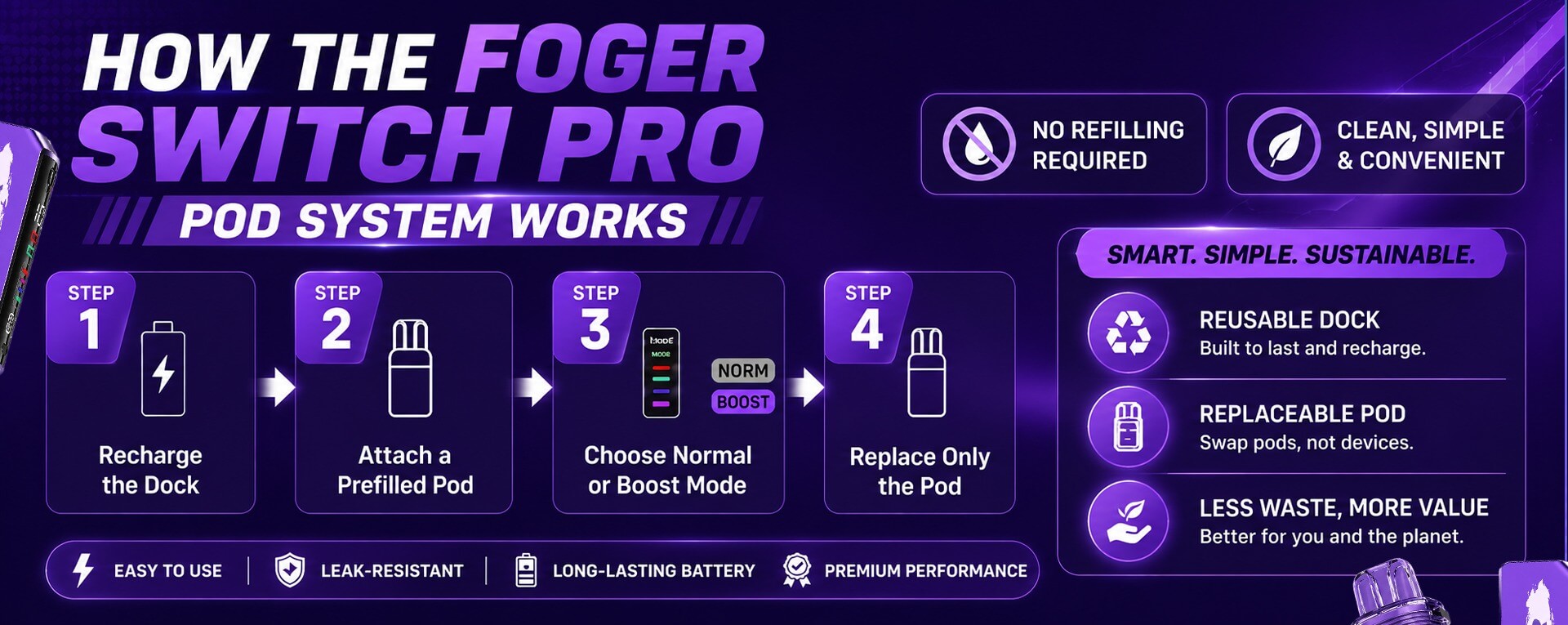
The Foger Switch Pro has two parts: a rechargeable dock and a prefilled pod.
The dock has an 850mAh battery. The pod has a 200mAh internal battery. Together, the system has 1,050mAh of total battery capacity.
The pod connects to the dock with magnets. The dock recharges through USB-C and powers the pod during use.
The OLED display shows battery and e-liquid levels. This helps you check the device before flavor starts to fade.
The Foger Switch Pro System Explained
The Foger Switch Pro has two parts: a rechargeable dock and a prefilled pod.
Important: The dock has an 850mAh battery. The pod has a 200mAh internal battery. Together, the system has 1,050mAh of total battery capacity.
The pod connects to the dock with magnets. The dock recharges through USB-C and powers the pod during use.
Quick Tip: The OLED display shows battery and e-liquid levels. This helps you check the device before flavor starts to fade.
What Comes With the Foger Switch Pro Kit?
The Foger Switch Pro Kit includes:
- One rechargeable magnetic power dock
- One prefilled Foger Switch Pro Pod
- USB-C charging
- OLED battery and e-liquid display
- Adjustable airflow
- Normal Mode and Boost Mode
The kit is the right starting point if you do not already own the dock.
Which Devices Are Compatible With Foger Pods?
Foger Pods are not limited to one little corner of the vape shelf.
The Foger Switch Pro started with its own magnetic dock and prefilled pod. Then the same style of setup showed up in the YOVO JB50K and Geek Bar MATE 60K . That is where things get interesting.
These three lines use the same magnetic dock-and-pod format. A Foger Switch Pro dock can work with a compatible YOVO JB50K or Geek Bar MATE 60K pod. In the same way, a Foger Pod can fit a compatible YOVO or Geek Bar MATE dock.
So, instead of collecting a new battery every time a different flavor catches your eye, one dock can open the door to more pod choices. You can stay with Foger flavors one week, then try a YOVO or Geek Bar MATE pod later without starting from scratch.
It is a small change, but it makes the system feel much less locked in. The dock stays in your pocket. The flavor is the part that gets to change.
Foger Pod Compatibility at a Glance
| Device or pod line | Works with the shared magnetic system? | What it means |
|---|---|---|
| Foger Switch Pro Pods | Yes | Made for the Foger Switch Pro dock |
| YOVO JB50K Pods | Yes | Can be used with a compatible Foger Switch Pro dock |
| Geek Bar MATE 60K Pods | Yes | Can be used with a compatible Foger Switch Pro dock |
| Foger BIT 35K | No | This is a complete all-in-one disposable |
| Standard Geek Bar disposables | No | They use a different device format |
| Standard YOVO disposables | No | They use a different device format |
If Geek Bar flavors are more your style, the Geek Bar MATE 60K review explains that side of the system.
Only use pods made for the Foger Switch Pro, YOVO JB50K, or Geek Bar MATE 60K format. If a pod does not connect smoothly and securely, do not force it.
Foger Pods vs. Regular Disposable Vapes
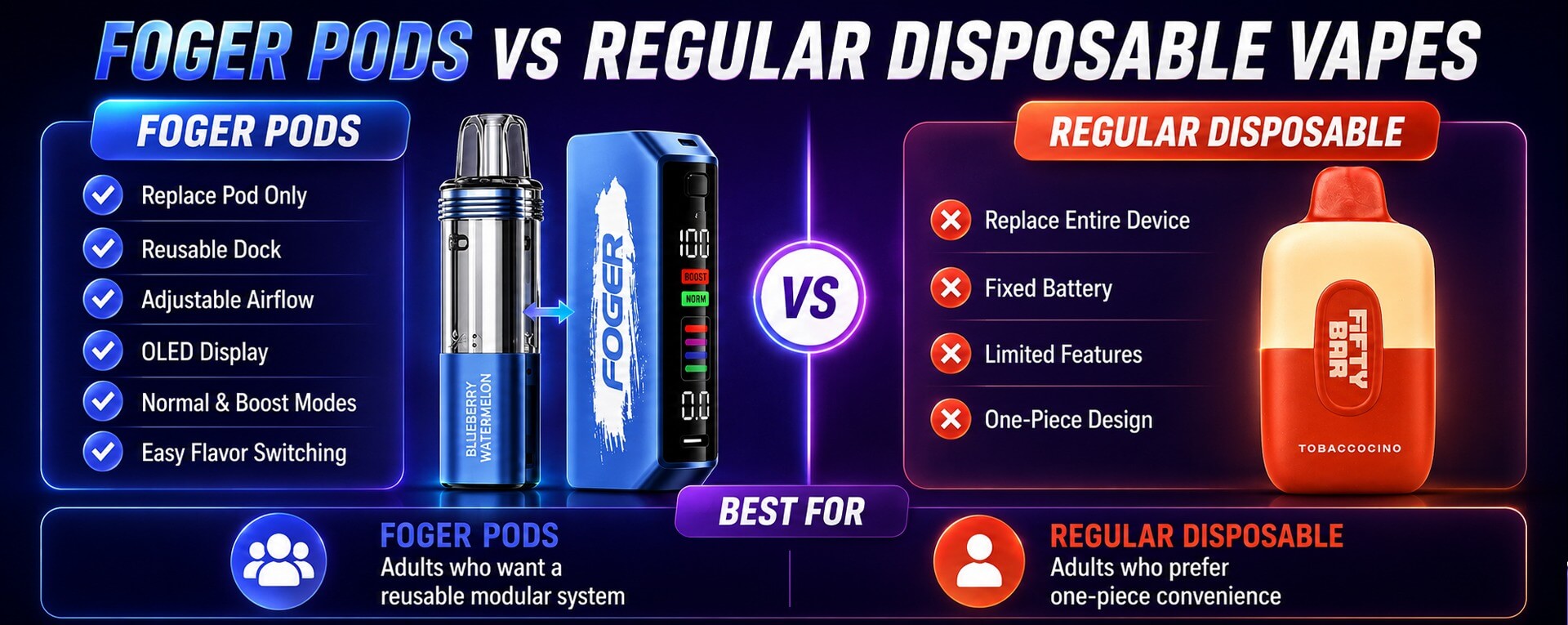
Foger Pods let you replace the pod. Regular disposable vapes require you to replace the whole device.
A standard disposable vape keeps the battery, coil, and e-liquid in one body. When the e-liquid is finished, the whole device is finished.
The Switch Pro separates the reusable power dock from the prefilled pod. You keep the dock and replace only the pod.
| Feature | Foger Switch Pro Pods | Regular disposable vape |
|---|---|---|
| Battery | Reusable magnetic dock | Built into each device |
| What you replace | Pod only | Entire device |
| Flavor switching | Replace pod | Buy another full device |
| Charging | Recharge dock with USB-C | Depends on the device |
| Display | OLED battery and e-liquid display | Varies by device |
| Best for | Adults who want a modular setup | Adults who want one-piece simplicity |
How to Use Foger Switch Pro Pods
Charge the dock, attach the pod, then adjust airflow and mode.
- Charge the Foger Switch Pro dock with a suitable USB-C cable.
- Remove the used pod from the magnetic dock.
- Align the new Foger Pod with the dock.
- Let the magnets connect the two parts securely.
- Check the OLED screen for battery and e-liquid status.
- Adjust airflow to your preferred draw.
- Choose Normal Mode or Boost Mode.
- Replace the pod when it is empty or the flavor becomes clearly off.
Do not refill a Foger Pod. It is prefilled and designed for replacement. Do not use a pod that is cracked, leaking, or loose on the dock.
For a closer setup walkthrough, read how Foger Switch Pro Pods work.
Normal Mode vs. Boost Mode
Normal Mode lasts longer. Boost Mode gives a stronger, warmer draw.
Normal Mode can deliver up to 30,000 puffs. It is the better setting for adults who want longer use and a steadier flavor output.
Boost Mode can deliver up to 18,000 puffs. It uses more power, but it can make the dual mesh coil feel warmer and the flavor feel more intense.
| Mode | Puff estimate | What it feels like |
|---|---|---|
| Normal Mode | Up to 30,000 puffs | Steadier draw and longer use |
| Boost Mode | Up to 18,000 puffs | Stronger, warmer flavor output |
Puff counts are estimates. Longer draws, airflow settings, and mode choice affect total use.
How Adjustable Airflow Changes Foger Pod Flavor
Tighter airflow gives a denser draw. More open airflow gives a lighter draw.
Important: A tighter airflow setting can make sweet, candy, and fruit flavors feel more concentrated. It can also make the vapor feel warmer.
A more open setting can make the draw feel looser. The flavor may feel lighter, but some adults prefer that style.
Quick Tip: Start near the middle. Then make small changes until the draw feels comfortable.
Foger Pods for Flavor Switching
Foger Pods make flavor switching easier because each pod is sealed and prefilled.
You can remove one pod and attach a different Foger Switch Pro Pod. You do not need to wash a tank or refill it with e-liquid.
This works well for adults who enjoy different flavor styles. You may want a fruit flavor for daytime and a candy or ice flavor later.
Important: The pod is not reusable after it is empty. Replace it with a new prefilled pod.
If you are choosing your next flavor, see the best Foger vape flavors guide.
The Vapers World Team Review: What the Switch Pro System Feels Like
The Foger Switch Pro feels like a rechargeable disposable vape with a more flexible setup.
The magnetic connection makes pod replacement quick. The OLED display also gives more useful information than a basic one-piece disposable vape.
Normal Mode is the better setting for regular use. It keeps the draw steady and helps the pod last longer.
Boost Mode makes more sense when you want a stronger flavor output. It can make fruit, candy, and ice profiles feel warmer and more pronounced. However, it uses battery power and e-liquid faster.
The visible tank is useful too. You can see when the e-liquid is getting low instead of guessing from weaker flavor alone.
TVW Verdict: The Switch Pro is a good fit for adults who want prefilled convenience but do not want to replace the full battery dock with every new flavor.
Foger Pod Flavor and Performance Rating
| Category | TVW Score |
|---|---|
| Flavor clarity | 9/10 |
| Flavor switching | 9/10 |
| Ease of use | 9/10 |
| Battery visibility | 9/10 |
| Airflow control | 8/10 |
| Normal Mode longevity | 9/10 |
| Boost Mode intensity | 8/10 |
| Refillability | 0/10 — prefilled only |
What Foger Pods Feel Like During Regular Use
Normal Mode feels smoother and steadier. Boost Mode feels warmer and stronger.
In Normal Mode, the flavor usually stays more even. This is the better choice for adults who want to use one pod over a longer period.
In Boost Mode, the flavor can feel stronger. Sweet and icy profiles may feel more noticeable. The tradeoff is faster battery and e-liquid use.
Important: As the pod gets close to empty, flavor may lose brightness. Vapor may also feel lighter. Check the visible tank and OLED display before assuming the battery is the problem.
Quick Tip: Stop using the pod if it tastes burnt, harsh, or clearly off.
Foger Pods vs. Refillable Pod Systems
Foger Pods are prefilled and replaceable. Refillable pod systems let you add your own e-liquid.
Choose Foger Pods if you want a sealed flavor pod with no filling, bottle handling, or coil changes.
Choose a refillable pod system if you want to choose your own e-liquid, nicotine strength, and refill schedule.
| Feature | Foger Pods | Refillable pod system |
|---|---|---|
| E-liquid | Prefilled | User-filled |
| Refilling | Not possible | Required |
| Coil changes | Built into each replacement pod | Depends on the device |
| Flavor changes | Attach a new pod | Empty, clean, and refill or change pod |
| Best for | Convenience | More e-liquid control |
Adults who want to fill their own e-liquid should compare refillable pod systems instead.
Where to Buy Foger Pods
The Vapers World is a trusted online source for adult disposable vape shoppers in the USA.
Buy the Foger Switch Pro Kit if you need the rechargeable dock. Buy Foger Switch Pro Pods if you already own the dock and want a replacement flavor.
The Vapers World makes it easy to compare Foger Pod flavors, starter kits, and other high-puff devices in one place.
You can shop Foger Pods to see current flavors and replacement options.
Foger Pods Pros and Cons
Pros
- Replace the pod instead of the full dock
- Prefilled and easy to use
- Magnetic pod connection
- 19mL e-liquid capacity
- Up to 30,000 puffs in Normal Mode
- Dual mesh coil
- Adjustable airflow
- OLED battery and e-liquid display
- Normal Mode and Boost Mode
Cons
- Pods are not refillable
- You need the Switch Pro dock before buying replacement pods
- Boost Mode uses battery and e-liquid faster
- Replacement pods only work with their confirmed dock format
Who Should Buy Foger Pods?
Buy Foger Pods if you already own a Foger Switch Pro dock and want a new prefilled flavor.
You should consider Foger Pods if you want:
- A modular alternative to one-piece disposables
- Easy flavor switching
- A visible e-liquid tank
- Adjustable airflow
- A reusable charging dock
- High-puff prefilled pods
Who Should Skip Foger Pods?
Skip Foger Pods if you want a fully refillable vape.
You may prefer another device if you want:
- To fill your own e-liquid
- To use a different nicotine strength
- A one-piece disposable vape
- A device without separate pod and dock parts
Are Foger Pods Worth It?
Foger Pods are worth it for adults who want a prefilled pod system with a reusable magnetic dock.
The Switch Pro system keeps the simple feel of a disposable vape. However, it gives you a separate dock, visible e-liquid tank, airflow control, and two output modes.
Start with the Foger Switch Pro Kit if you need the dock. If you already own one, choose your next replacement pod from the Foger Vape collection.
FAQs
What are Foger Pods?
Foger Pods are prefilled replacement pods for the Foger Switch Pro magnetic dock system.
Are Foger Pods refillable?
No. Foger Pods are prefilled and replaceable. Do not refill them.
Do I need the Foger Switch Pro Kit before buying Foger Pods?
Yes, if you do not already own a Foger Switch Pro dock. The kit includes the rechargeable dock and a prefilled pod.
How many puffs does a Foger Pod have?
A Foger Switch Pro Pod delivers up to 30,000 puffs in Normal Mode and up to 18,000 puffs in Boost Mode.
How much e-liquid is in a Foger Switch Pro Pod?
A Foger Switch Pro Pod holds 19mL of prefilled e-liquid.
Can I use Foger Pods with the Foger BIT 35K?
No. The Foger BIT 35K is an all-in-one disposable vape. It does not use replacement pods.
What is the difference between Normal Mode and Boost Mode?
Normal Mode is designed for longer use. Boost Mode gives a stronger and warmer draw, but it uses battery power and e-liquid faster.
Where can I buy Foger Pods?
You can buy Foger Switch Pro Pods at The Vapers World. Start with the Foger Switch Pro Kit if you need the rechargeable dock.
